
| Grade Level | System Requirement | Product Number |
|---|---|---|
| Preschool-K | Apple 64K | A165 |
| Fun-filled lessons in numbers from one to 20! Children count animals on a safari, match numbers in a magic show, supply a pet store with puppies, and much more. You can adjust the program for children with different keyboarding abilities. | ||
Introduction
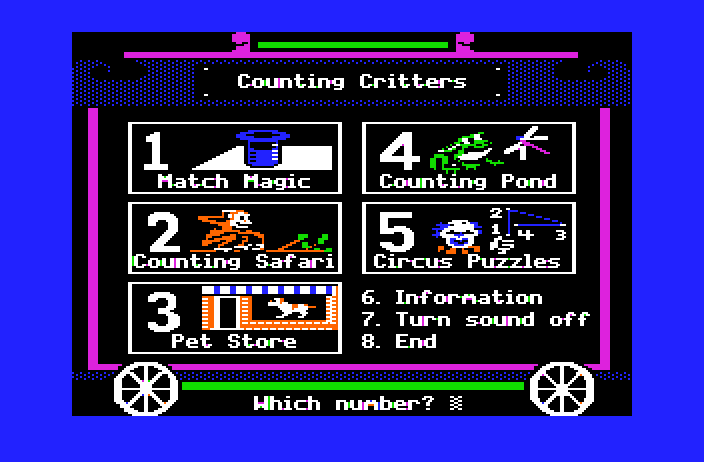
Counting Critters is a series of five programs designed to give preschool and kindergarten children individual practice on number and counting concepts.
In MATCH MAGIC, students practice visual discrimination of the numerals 1 through 20 by matching a numeral on a hat with the same numeral in a list.
COUNTING SAFARI helps students practice counting one to twelve safari animals.
In PET STORE, students are shown numerals from 1 to 12 and asked to put the corresponding number of puppies in a pet store window.
Two types of animals appear on the screen in COUNTING POND. Students distinguish between the groups and count just one type of animal.
In CIRCUS PUZZLES, students put numerals from 1 to 20 in sequence. As they enter the correct numerals, a dot-to-dot puzzle is completed.
Management Options allow you to modify the programs to meet the needs of your students. To access the Management Options, go to the main menu. While holding down the Control Key, type the letter A (Control-A). For complete instructions on using these options, refer to the “Use in an Instructional Setting” sections in this manual.
A hand-shaped pointer allows students to enter their answers easily. They need only move the hand to the answer they wish to choose and then press the Return Key. They can move the hand to their next choice by pressing the Space Bar, the Right-Arrow Key, or the Down-Arrow Key. If they wish to move to a previous choice, they can press the Left-Arrow Key or the Up-Arrow Key. Students who are familiar with the keyboard can enter their response by simply typing the number keys.
You may turn the sound effects off before you begin a program by selecting Option 7 on the main menu, or you may turn them off during a program by holding down the Control Key and typing the letter S (Control-S).
You may leave a program by pressing the Escape (Esc) Key twice anytime the program is waiting for a response.
To use Counting Critters, you will need a Counting Critters program diskette, a 64K Apple computer, a monochrome or color monitor, and a disk drive.
Counting Critters is a product from the MECC Early Learning Series. This series presents opportunities for children to practice a wide variety of readiness skills. Additional products currently available include Arithmetic Critters, First-Letter Fun, Fun from A to Z, and Paint with Words.
DESCRIPTION
In MATCH MAGIC, students practice visual discrimination of the numerals 1 through 20 by matching a numeral on
a magician’s hat with the same numeral as it appears in a list. When students correctly match a numeral, the program illustrates the meaning of the numeral by showing the corresponding number of animals.
Curriculum Area: Mathematics
Subject: Arithmetic
Topic: Visual Discrimination, Number
Type: Drill and Practice
Reading Level: Pre-reading
Grade Range: Preschool – Kindergarten
Classroom Use: Individual
LEARNING OBJECTIVES
After using this course-ware, the student should be able to:
- discriminate between the numerals 1 through 20;
- recognize that numerals are symbols used to represent numbers.